Cannot compute histograme

For some reson, I cannot compute histograms in a layer that seems to be perfectly valid.

I have two layers that have been produced using the same BandMaths operation. This is the result for B2

However, with a different layer that looks perfectly valid I obtain the error that No valid histogram could be computed.

No more clues about what is going on. I use, as you can see, no ROI mask in both cases.

What is going on? How can I start debugging this?

I advanced a little bit in the debugging, but I still can’t figure this out.

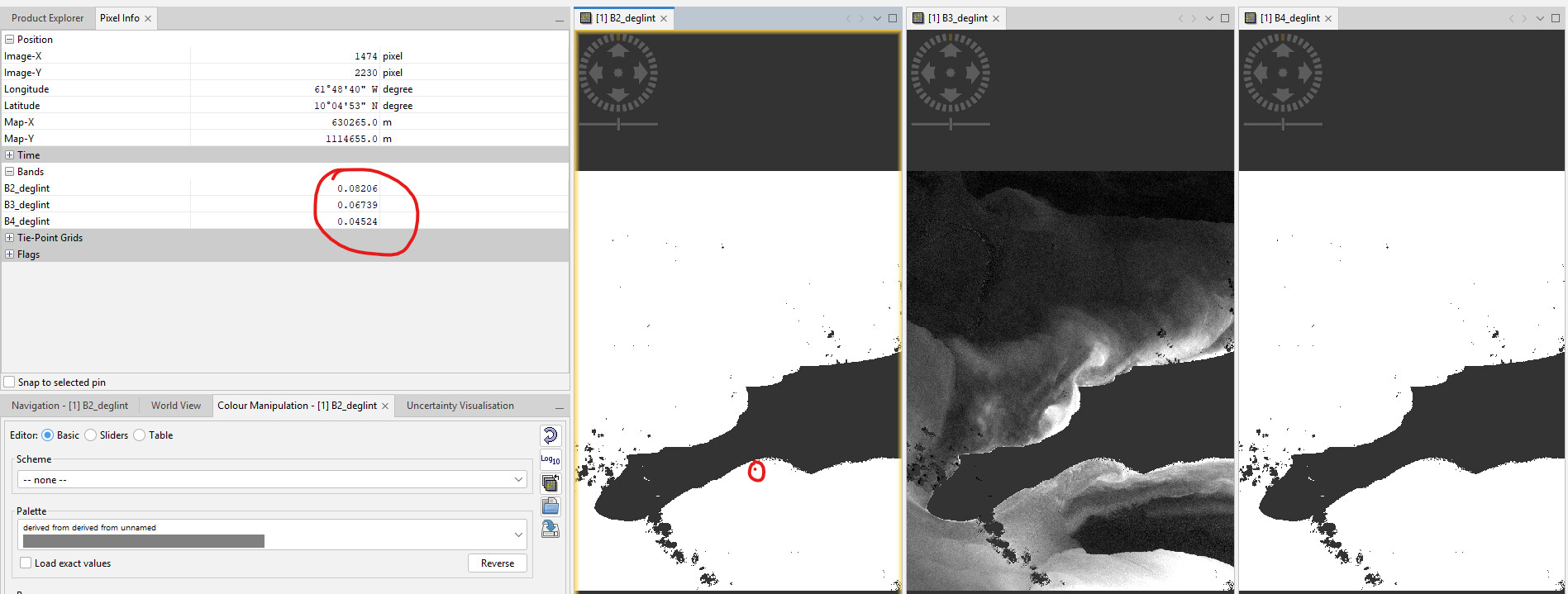
I have here my 3 layers. The two that look black and white cannot compute histogram. The one that looks good, can.

However, not only the computation for each band was done using the same logic, but if you use Pixel Info you can see that images that look like masks they actually have valid values.

Any way to force re-calculation of statistics, maybe?

Two very basic questions:

-Have you check in the Colour Manipulation first and try to stretch the histogram there?

-Have you selected with the mouse the image you want to compute the histogram?

I’ve run into this exact error before. Usually, it’s just a matter of the data not being fully indexed yet. Re-importing the product or checking the ‘No-Data’ value settings in the properties usually does the trick for me.