Yesterday I installed SNAP v.12 on Windows 10 machine.
Next I did the the plugins upgrade.
Now I’m getting this message
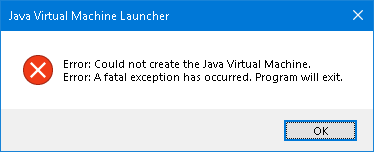
Please help with this issue.
Should I install anything else besides SNAP?
Any other SNAP user experiencing this?
Yesterday I installed SNAP v.12 on Windows 10 machine.
Next I did the the plugins upgrade.
Now I’m getting this message
Please help with this issue.
Should I install anything else besides SNAP?
Any other SNAP user experiencing this?
Hello @hriston_bg,
We have tried to reproduce your issue, by clearing all the SNAP cache and the user data, open the SNAP 12 and updating it, just before replying to your this post on the STEP Forum, but, we cannot reproduce it.
 A potential solution for you, is to delete the following directory:
 C:\Users\user\AppData\Roaming\SNAP
If you reproduce the issue again, please let us the following information, which can help us on the investigation of the issue you’re facing with SNAP 12:
java -versionC:\Users\user\AppData\Roaming\SNAP\var\log\messages.log. If that file is empty, send us the content from C:\Users\user\AppData\Roaming\SNAP\var\log\messages.log.0Best regards.
Adrian
@adraghici Thank you for the reply. I checked the C:\Users\user\AppData\Roaming, but no SNAP folder was found, so nothing to
delete there. Now I’ll install again and check if the problem is still there.
@hriston_bg The SNAP always create a directory SNAP in the C:\Users\{user}\AppData, where {user} is the username of the current logged in windows user.
Best regards
Adrian
@adraghici After clean install the folder is there.
But again the message
appears again.
Good. That is the expected.
Not good. 
Please let us the information requested on the 1st reply to this post.
Best regards
Adrian
@adraghici Please find below the information:
1.
Device name DESKTOP-NAM9H3M
Processor Intel(R) Xeon(R) CPU E5-2680 v4 @ 2.40GHz 2.40 GHz (2 processors)
Installed RAM 64.0 GB
Device ID xxxxxxxxxxxxxxxx
Product ID xxxxxxxxxxxxxxxx
System type 64-bit operating system, x64-based processor
Pen and touch No pen or touch input is available for this display
| Edition | Windows 10 Pro |
|---|---|
| Version | 22H2 |
| Installed on | 6/15/2023 |
| OS build | 19045.6036 |
| Experience | Windows Feature Experience Pack 1000.19062.1000.0 |
I hope this info is the requested one.
Just a final question - should I run the installer/application as Administrator?
@hriston_bg
Thank you for the all requested information, you provided us. 
If you have installed SNAP 12 from a standard windows user, without administrative rights, you can uninstall it and reinstall using an administrative windows user.
We continue the investigation and we will come back with the result of the investigation of we request more information when needed.
Best regards
Adrian
In the meanwhile I’ll remove the bad installation and I’ll try to install with Administrator rights.
OK?
BTW Is there an issue having two processors?
Yes! Sure.
No.
We have a question for you:
 Do you had an older version of SNAP installed on this system, before installing SNAP 12?
Best regards
Adrian
I used version 9.0 before upgrading.
I also did another experiment - fresh install, upgrade and run SNAP. It works, but
I’m not sure if it will run after restart.
I understand and I think that if you installed the SNAP 12 over SNAP 9, without uninstalling it, some leftovers from SNAP 9, corrupted the SNAP 12 installation.
So, the fresh install (uninstall the SNAP 9 before installing the SNAP 12) was the solution for your issue with SNAP 12.
I don’t know a reason to not work after restarting the application / system.
Please let us whether the issue appears again.
Best regards
Adrian
@adraghici you are right.
The issue was the installation of SNAP 12 over the older SNAP. He could go through his Apps and Devices, uninstall SNAP totally, restart his system, install SNAP 12 he should be good to go. (Of course delete the residual folders from appdata)
@adraghici @profjona Thank you for the suggestions.
With fresh install I meant that v.9 was removed before installing v.12.
Currently I install only v.12, but the problem persists - after installation and upgrade it once, but on the next start the message is as I showed already.
@profjona Could you please make clear where are the the residual folders from appdata? After removal of SNAP in C:\Users\hristo\AppData\Roaming there is no SNAP folder anymore. My idea is to check the registry and clean it, but such tool I have on this machine.
Not good.
So, when the SNAP 12 restarts after the upgrade, it works, but, when you close it and try to start it again, the error occurs.
Also, do you tried to install with administrative windows user?
There are no other residual folders on appdata, outside of Roaming/SNAP.
True.
There are no registry entries to clean after uninstalling the SNAP.
Note:
When uninstall or install the SNAP, the installer tells the user to select which SNAP data will be removed after uninstall or before install the SNAP:
AppData\Roaming\SNAP and the C:\Users\{user}\.snap)AppData\Roaming\SNAP only) So, if the second option was selected during the uninstall of the SNAP 9 and the install of the SNAP 12, a potential solution is to manually delete the SNAP user data (the C:\Users\{user}\.snap), and the SNAP-internal configuration data (the AppData\Roaming\SNAP) to reset the SNAP application at the state of the first use (there are no reinstall needed), then start the SNAP 12 application and update it.
After trying the potential solution explained above, if the issue is not fixed, please send us the output of the execution for the following command, in a windows terminal (CMD): cd C:\Program Files\esa-snap\jre\bin && java -version
Best regards
Adrian
@adraghici Thank for being kind to guide me this afternoon.
In the folder AppData\Roaming\ there is no SNAP folder.
On the other hand in C:\Users{user}\ there is .snap folder I
didn’t know it should be empty. I’ll delete all its content and will try
installing again.
Wish me luck 
In case the issue remains I’ll send you the result from java -version command.
I have a question for you, about this:
The SNAP folder from AppData\Roaming\ disappears after getting the error or you just uninstalled the SNAP 12 from your system?
This folder must not be empty.
If you’re planning to fresh reinstall the SNAP application, you should select the 1’st option, when the installer tells you to choose which data will be deleted, as explained in the above reply.
Good luck! 
Okay.
We’re waiting for the good news from you!
Best regards
Adrian
No good news. Again same result after install and restart.
The file for java version is attached here -
java_Version.txt (150 Bytes)
I suppose there is something with rights of the Windows user I use. Actually it shows as Administrator, but I’m not quite sure what is going on.
Also in the C:\Users\hristo\AppData\Roaming\SNAP\var\log\messages.log file there are several warnings. See the file
messages.log (68.4 KB)
Final remark - downgraded to v.9 no new features  , but works.
Not good.
The output is as we expected.
If the SNAP application is installed on C:\Program Files\esa-snap, the windows user, is Administrator.
We checked the last log file from you, which contains the output from the last successful usage session of SNAP 12, but no information related to the error was logged, which can give us a hint for the source of the issue you’re facing.
Also, the log file, give us the path where the SNAP 12 is installed, which is C:\Program Files\esa-snap, so, the windows user is Administrator.
If you want to downgrade the version of SNAP, there are 2 intermediary versions of SNAP between SNAP 9 and SNAP 12, which you can use, until we understand how the issue occurs on your system, and a solution is found.
We tried to install and upgrade the SNAP 12 over SNAP 9 on a fresh system, where the SNAP was not installed before and no java is installed (as we understand, the configuration of your system, based on the information you give us), and we cannot reproduce your issue.
We need more information to understand what happens on your system with the SNAP 12, after updating it.
What is the contents of the C:\Users{user}\.snap after getting the error?
Please let us the size of the following directories:
C:\Program Files\esa-snapC:\Users{user}\.snapC:\Users\{user}\AppData\Roaming\SNAPto compare with the installation on our test machine.
Please let us the output of the execution for the following command, in a windows terminal (CMD): cd C:\Program Files\esa-snap\bin && snap64.exe
Best regards
Adrian
@adraghici Sorry for not being able to reply earlier due to institutional engagement.
Later today I’ll do the steps you asked me to do.
Before that one more specific thing - I try to install SNAP being in remote desktop session. Can this cause any problems?
Thank you.