Hi there,
is there some way to read the version of SNAP and the toolboxes from the command line? This would be super useful.
This is my current python workaround:
import platform
from pprint import pprint

module = 'microwavetbx'

patterns = {'core': r'org.esa.snap.snap.core',
            'desktop': r'org.esa.snap.snap.ui',
            'rstb': r'org.csa.rstb.rstb.kit',
            'opttbx': r'eu.esa.opt.opttbx.kit',
            'microwavetbx': r'eu.esa.microwavetbx.microwavetbx.kit'}

if module in patterns.keys():
    pattern = patterns[module]
    pattern += r' \[(?P<version>[0-9.]+) [0-9.]+ (?P<date>[0-9]{12})'

system = platform.system()
if system in ['Linux', 'Darwin']:
    path = os.path.join(os.path.expanduser('~'), '.snap', 'system')
elif system == 'Windows':
    path = os.path.join(os.environ['APPDATA'], 'SNAP')
else:
    raise RuntimeError('operating system not supported')

fname = os.path.join(path, 'var', 'log', 'messages.log')

with open(fname, 'r') as m:
    content = m.read()
match = re.search(pattern, content)
if match is None:
    raise RuntimeError(f'cannot read version information from {fname}.'
                       f'\nPlease restart SNAP.')
pprint(match.groupdict())
It feels really weird reading out a log file that is only created when SNAP has once been started normally.
You could use gpt --diag but this provides only the SNAP release version, not the version of the toolboxes.
> gpt --diag
INFO: org.esa.snap.core.gpf.operators.tooladapter.ToolAdapterIO: Initializing external tool adapters
INFO: org.esa.snap.core.util.EngineVersionCheckActivator: Please check regularly for new updates for the best SNAP experience.
SNAP Release version 13.0.0
SNAP home: C:\Program Files\esa-snap\bin\/..
SNAP debug: null
SNAP log level: null
Java home: c:\program files\esa-snap\jre
Java version: 21.0.6
Processors: 16
Max memory: 22.0 GB
Cache size: 1024.0 MB
Tile parallelism: 16
Tile size: 512 x 512 pixels

To configure your gpt memory usage:
Edit snap/bin/gpt.vmoptions

To configure your gpt cache size and parallelism:
Edit .snap/etc/snap.properties or gpt -c ${cachesize-in-GB}G -q ${parallelism}
Better is probably:
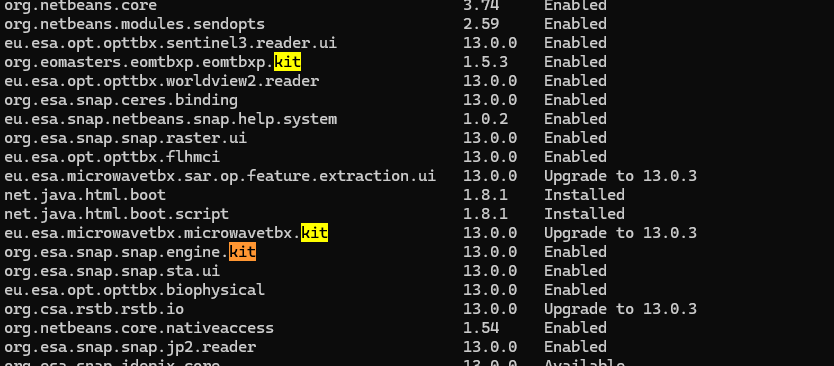
snap --nosplash --nogui --modules --list --refresh
This provides you with a list of all modules and there version.
You can search for the toolboxes by looking for ‘kit’ keyword or the whole id.
Probably doable with some python magic.
Thanks so much @Marco_EOM! The second command is exactly what I was looking for. I can call it from python alright but this opens some blank window on my Windows PC:
Any idea how to avoid this?
Mmh?! No idea. I guess you are using the - -nogui option. This should avoid the GUI to show up.
Is it working from the command line? Maybe the invocation from Python behaves differently.
Are you on Linux or Windows?
Yes, I am calling it with --nogui. I have tried via python and via the shell. Both open the window. I can kill this process by calling taskkill /IM snap64.exe but don’t want to do it deep in my Python code since this might also kill a GUI opened by the user.
Unfortunately this process has a different ID than the process I started in Python. Otherwise I could do something like this:
import platform
import subprocess as sp

cmd = [r'C:\Program Files\esa-snap\bin\snap64.exe', '--nosplash',
       '--nogui', '--modules', '--list', '--refresh']

proc = sp.Popen(args=cmd, stdout=sp.PIPE, stderr=sp.PIPE, encoding='utf-8')
out, err = proc.communicate()
if platform.system() == 'Windows':
    sp.run(["taskkill", "/PID", str(proc.pid)], check=False)
Small correction: when directly running it, I do not get this window on first run in a fresh shell. However, I get these warnings:
WARNING: A terminally deprecated method in java.lang.System has been called
WARNING: System::setSecurityManager has been called by org.netbeans.TopSecurityManager (file:/C:/Program%20Files/esa-snap/platform/lib/boot.jar)
WARNING: Please consider reporting this to the maintainers of org.netbeans.TopSecurityManager
WARNING: System::setSecurityManager will be removed in a future release
On repeated runs I do no longer get these warnings but the window opens.
I think the entire situation boils down to SNAP not properly exiting when being run via the shell. This causes the different behavior on repeated runs in shell or IDE (where I run Python). I thought I could just kill every snap64 process that started after I run the command inside a python process, but this did not work because I had previously called the command on the shell and exited it with Enter (unfortunately this is needed). Closing the shell resolves this.
When pressing Enter I thought the process exits for good but apparently it doesn’t.
When opening SNAP via the GUI and then closing it, it can’t even be killed with taskkill. It just keeps running. I can still see it with tasklist.
Luckily, one can get around all of this with this:
import subprocess as sp

cmd = [r'C:\Program Files\esa-snap\bin\snap64.exe', '--nosplash',
       '--nogui', '--modules', '--list', '--refresh']

proc = sp.Popen(args=cmd, stdout=sp.PIPE, stderr=sp.PIPE,
                text=True, encoding='utf-8', bufsize=1)

counter = 0
lines = []
for line in proc.stdout:
    if line.startswith('---'):
        counter += 1
    else:
        if counter == 1:
            lines.append(line.rstrip())
    if counter == 2:
        proc.terminate()
proc.wait()

print('\n'.join(lines))
As long as I don’t have a parallel shell running where I previously ran the command, this works also on repeated runs.
btw.. why is it saying “Upgrade to 13.0.3” for some although I have installed all updates?
Another fun fact:
if the DISPLAY variable is set this won’t work:
Exception in thread "main" java.awt.AWTError: Can't connect to X11 window server using 'xyz' as the value of the DISPLAY variable.
(‘xyz’ just being a dummy test value)
So one has to first call unset DISPLAY to run a command where you explicitly define --nosplash --nogui.
@Marco_EOM can you help me out here?
Also, on Windows I had to append --console suppress for it to work.
I’m sorry John. I’ve run out of ideas.
This seems to behave somehow erratic. For me the GUI never shows up when I specify --nosplash --nogui. I’ve also enabled the plugin checks for every startup. In the options and in the plugin manager settings. I thought this may trigger something on start, but still no gui.
Sorry, I can’t help you further.
no worries. Thanks a lot Marco.