I have developed a Java web application which downloads the Sentinel-1 images and then applies a chain of SNAP operators to pre-process the data and to perform a change detection between two S1 images.
I am facing a Java memory leak problem (i.e. Java heap memory keeps growing without being release by the garbage collector) while the referred SNAP operators over time. I will try to further detail the problem…
I am using SNAP version 4.0.1 and S1tbx version 4.0.0 and I am importing the following:
s1tbx-io
s1tbx-op-sar-processing
s1tbx-op-insar
s1tbx-op-calibration
s1tbx-op-sentinel1
s1tbx-op-utilities
Before calling any SNAP operators I perform the initialization by calling:
On each pair of images, for each image, I call the following pre-processing SNAP operators:
Subset
Apply-Orbit-File
ThermalNoiseRemoval
Calibration
Terrain-Correction
and then I perform the change detection by applying the “BandMaths” operator.
Note that each execution of the above mentioned processing chain is run in a separate thread.
The Java heap memory keeps growing after each execution until it reaches a point where the application crashes with an out of memory exception.
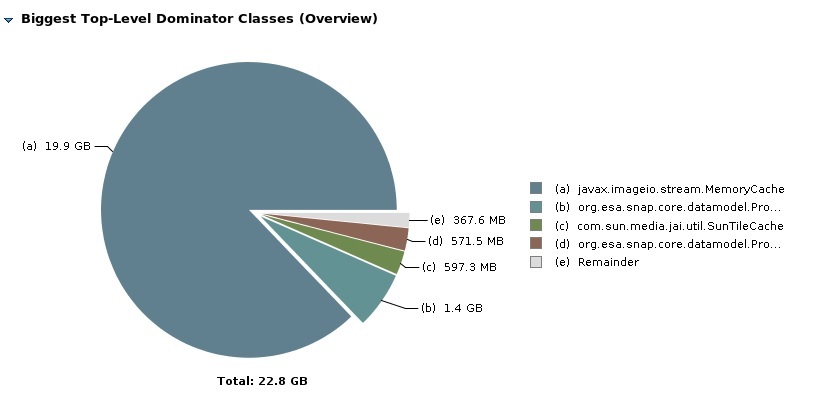
Analyzing a crash memory dump, it is possible to see that most of the Java heap memory is occupied by instances of “javax.imageio.stream.MemoryCache” instances:
Let me ask you some questions.
Which data format are you using for the input and output files? Maybe Big-GeoTiff?
Do you dispose the products (Product.dispose()) when processing finished?
But your are reading from the original S1 data, right? This might cause the problem.
I found usages of MemoryCacheImageInputStream in several S1TBX reader. This input stream uses the class MemoryCache.
I think those streams are not closed when the product is disposed. This might cause the problem. I haven’t followed this to the End. @JunLu can you have a look?
Yes, I am reading from the original S1 data (zip file).
I am using the Read operator in the same way I use the other operators and previously I was reading the products calling directly the ProductIO.readProduct() method, but with the same behavior.
As we all know, Java has automatic garbage collection, which basically clears unwanted objects from the application. This garbage collection will only free up objects that are no longer referencing or are not reachable. When objects that are no longer needed still reference other objects, the garbage collector will not recognize these objects as unwanted ones, and this will not help in reclaiming the memory. If this persists, it will slowly lead to a memory leak. This behavior that you explain seems to indicate a memory leak-like situation caused by accumulation of internal caches, particularly javax.imageio.stream.MemoryCache, during repeated execution of SNAP operators. Looking at high level you processing logic looks good but, SNAP and ImageIO internally use caching mechanisms for image data. These caches of course may not be released promptly, especially when running operations repeatedly in separate threads. Each processing chain may create new image products and streams and whatever objects created may slowly keep occupying memory over time and they may not be taken care to be cleaned up. When you plan to run each execution in a separate thread can further delay or complicate garbage collection. This is because the references may still be retained internally. So the major issue here is that the image streams and product resources are not being fully disposed after use. In SNAP, it is important to explicitly release resources by disposing of products once processing is complete. Without proper disposal, underlying buffers and caches (like MemoryCache) can continue occupying heap memory.
So the simple action here to overcome this issue is to ensure that all SNAP Product objects are properly disposed (e.g., using product.dispose()), and avoid unnecessary parallel threads if not required. For a deeper understanding of common signs of a Java memory leak, identifying memory leaks by analyzing heap dumps, check out this blog, From Symptoms to Solutions: Troubleshooting Java Memory Leaks & OutOfMemoryError.