Steps of snaphu Algorithm for phase unwrapping , To run the unwrapping in snaphu follow steps bellow:
- In SNAP use the Radar -> Interferometric -> Unwrapping -> Snaphu Export tool to export the wrapped interferogram;
- Navigate to the folder containing the exported data using File explorer;
- Right click the snaphu.conf file and open it with Mousepad;
- Copy the command at line 7 (to avoid errors with the number of lines);
- In command line, navigate to the folder where your data are stored and run the coppied command;
Example:
cd /shared/data/sentinel1/snaphu/S1A_IW_SLC__1SSV_20161016T105004_20161016T105031_013514_0159DC_4744_Orb_Stack_ifg_deb_flt_ML/
snaphu -f snaphu.conf Phase_ifg_IW3_VV_16Oct2016_22Oct2016.snaphu.img 5952
If you receive an error go back to the snaphu.conf and place comment before LOGFILE. Line 28 should then be: # LOGFILE snaphu.log

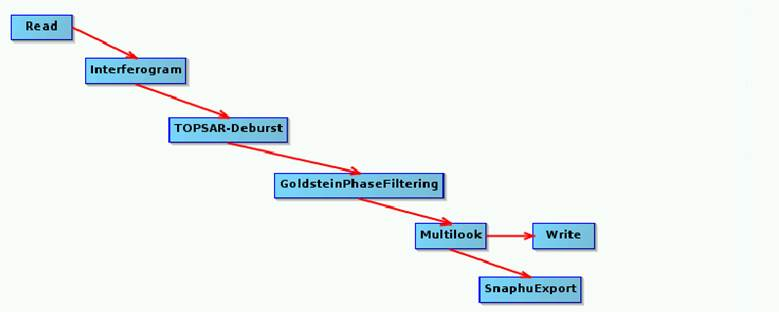
Keep in mind, that you need the multilooked product (input for Snaphu Export ) to import the unwrapped phase back to SNAP. So you could use for example following graph to preprocess your data (input is coregistered stack, the steps can vary based on application):
Import to SNAP
To import the unwrapped phase from SNAPHU processing, go to Radar -> Interferometric -> Unwrapping -> Snaphu Import . In the first Read tab , select the multilooked product, in the second Read tab , navigate to the snaphu folder and import the Unwrapped*.hdr file (not the .img).
Source: https://rus-copernicus.eu/forum/t/snaphu-how-to-run-snaphu-unwrapping-on-rus/120