I have a subset of a Sentinel-1 GRD product of a known size 10200x3375.
I apply a preprocessing workflow on it in order to prepare it for further steps:
After the Geometric correction (Ellipsoid) step I realized that the size of the product increases while the “total product size” shrinks ! What exactly happens in geometric correction and why this change happens?
Raw subset:

Preprocessed subset:

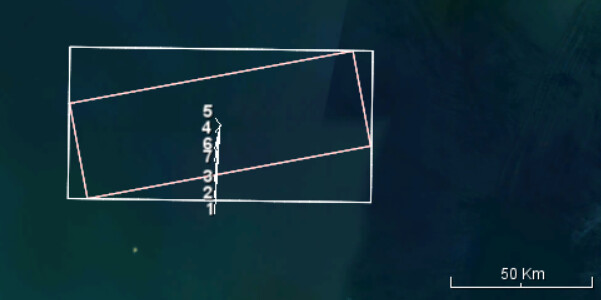
Can you show a before and after comparison of the two images? With geometric correction you entirely change the image geometry. My guess is that the created image is rotated and the file contains a lot of nodata values. Also I guess that the output file is compressed. This reduces overall data volume particularly in nodata areas.
1 Like
Thanks John you are right, the geometry changes and increase in raster size is due to the additional NAN pixels.
Image bellow shows the position of raw subset extracted from sentinel-1 tile and the Geometry corrected version of it (red borders):
I dont undrestand however the metadata information about total_size
In the metadata of the files (pictured above) the size has reduced from 147900235 MB to 448 MB which is a huge reduction. The size of the output BEAM-DIMAP file is being increased from 262 MB to 439 MB!
That is indeed strange. Thanks for the clarification. I don’t have an explanation for this.
I guess the total size for the raw subset is a miscalculation. 147.9 TB is a bit too much. 
Maybe @jun_lu or @lveci can clarify this.
Yes, the size on disck of the corresponding .data file is 131 MB. This is why it was surprising to see such a number in metadata.