Did you place the files in the correct directory similar to mine: anaconda3/envs/isce2/share/isce2/stripmapStack
Thanks for your help.
Yes i did it, and i ran stackStripMap.py, after that i got 9 files in runfile folder.
i recently ran ./run_0* but it doesn’t work and my SLC_crop is empty. How should i run these files in my run files?
Run the run files one at a time using the commands (for each separately):
chmod +x run_files/run_01_reference
run_files/run_01_reference
You have to run it outside the run_files directory; the chmod gives permission for the file to be run.
if should reinstall isce ,used gcc -7
Dear Tonianr,
I am using Ubuntu 22 and stamps 4.1 beta. This happened to me, and I am using g+±9, but:

How could I solve this?
Hey, from which directory do we need to run these commands?
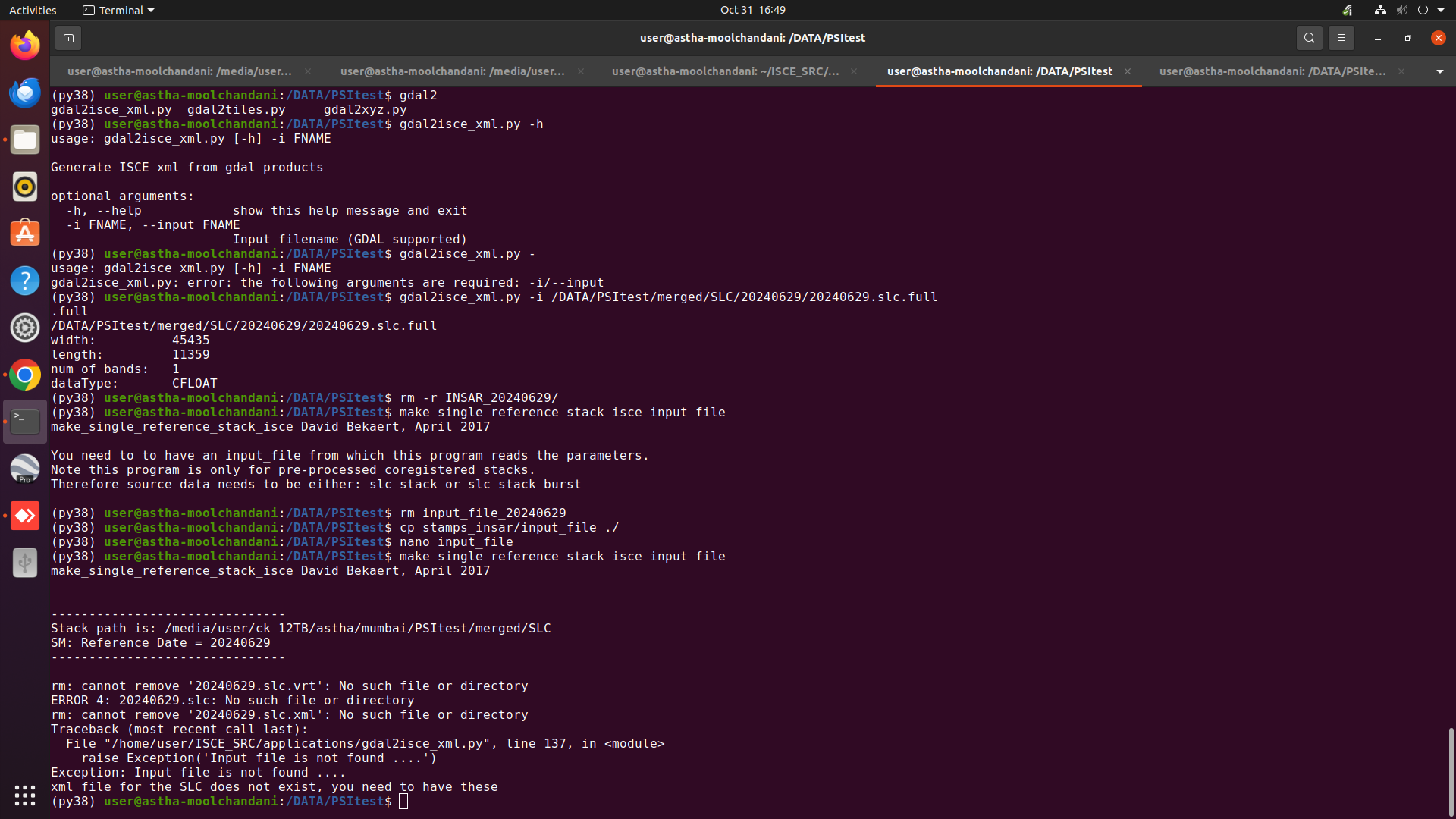
Hey, could you please help me with the following errors while running make_single_reference_stack_isce and mt_prep_isce?
(base) user@astha-moolchandani:/DATA/PSItest/INSAR_20240629$ mt_prep_isce 0.4
mt_prep_isce David Bekaert, February 2016
Amplitude Dispersion Threshold: 0.4
Processing 1 patch(es) in range and 1 in azimuth
/home/user/ISCE_SRC/isce/bin/mdx/gawk: Not a directory.
/home/user/ISCE_SRC/isce/bin/mdx/gawk: Not a directory.
grep: No match.
/home/user/ISCE_SRC/isce/bin/mdx/gawk: Not a directory.
grep: No match.
/home/user/ISCE_SRC/isce/bin/mdx/gawk: Not a directory.
grep: /DATA/PSItest/INSAR_20240629/reference/baseline: No such file or directory
/home/user/ISCE_SRC/isce/bin/mdx/gawk: Not a directory.
cat: width.txt: No such file or directory
cat: len.txt: No such file or directory
ls: cannot access ‘/DATA/PSItest/INSAR_20240629/*/secondary.slc’: No such file or directory
opening /DATA/PSItest/INSAR_20240629/reference/reference.slc…
Error opening file /DATA/PSItest/INSAR_20240629/reference/reference.slc
cat: /DATA/PSItest/INSAR_20240629/calamp.out: No such file or directory
@: Assignment missing expression.